 November 13, 2026
4 Key Considerations for Employee Safety Devices
Consider a hotel housekeeper: she knocks, calls out, and enters a guest room alone. If the guest turns aggressive, her radio might be left on the cart, and the phone in her pocket may not be within reach. This is exactly the kind of risk the AHLA’s 5-Star Promise aims to address. The association has pushed US hotels to equip staff with employee safety devices.
Employee safety devices help staff call for assistance and provide responders with emergency information. In this guide, we focus on the hardware side: how triggers work, where devices go, false alarms, and rollout.
How a Safety Device Raises an Alarm?
| Trigger | Works If the Employee Is Incapacitated? | False-alarm Risk | Applications |
| Manual SOS / Panic Button | No | Low to medium | Hotels, hospitals, reception and public-facing staff |
| Fall, Man-down or No-motion Alert | Yes, if the event is detected | Medium | Lone maintenance, security and cold-room work |
| Missed Check-in | Yes, after the timer expires | Low | Patrols and predictable lone-work routines |
| Geo-fence or Zone Breach | Yes | Medium | Restricted areas and high-risk zones |
Coverage and Accuracy
| Option | Typical Coverage | Recurring Radio Cost | Typical Fit |
| BLE badges with gateways | Building-wide, with planned beacon and gateway placement | No SIM per badge | Hotels, hospitals, schools and warehouses |
| LoRaWAN® devices with gateways | Site-wide indoor and outdoor | No SIM per device | Campuses, plants, mines and large facilities |
| Cellular devices | Wide-area, where signal exists | SIM and data plan per unit | Mobile teams and outdoor work |
BLE signals can reach up to 400 meters outdoors, but they will not reliably penetrate three floors of concrete. With proper gateway deployment, LoRaWAN® can provide coverage across the entire site, both indoors and outdoors. Cellular, however, still has indoor dead zones. It works well for wide-area coverage, but it cannot identify the specific hotel room a worker is in.
Positioning accuracy is another factor to take into account. Standard BLE positioning measures signal strength and gives you a zone, such as the east wing or cold room 3.
For most room-level location requirements, here is the most practical choice. A LoRaWAN® badge scans for nearby BLE anchors mounted in fixed locations such as hotel rooms. Once an anchor is detected, the badge transmits the data via the LoRaWAN® gateway to the central server. This closed-loop process enables precise room-level positioning, ensuring a rapid and effective emergency response. Therefore, define your positioning accuracy requirements before purchasing the hardware.
False Alarms and Latency
A personnel safety program can fail even when no real emergency occurs. Accidental button presses in pockets can trigger too many alerts,so responders learn to ignore them. Trigger logic helps mitigate this and confirms that an alert has been sent. As a result, employees may stop wearing their badges and leave them in drawers. Trigger logic solves this: single presses are quick, while double or long presses help avoid false triggers. Vibration, LED indicators, and a buzzer notify the wearer that an alarm has been sent. With a two-way gateway, a supervisor can remotely activate the tag or trigger an audible alert. This is helpful for confirming an alarm or stopping an alert when necessary.
The advertising interval also deserves careful attention. Configurable tags typically allow users to set advertising intervals ranging from 100 milliseconds to 10 seconds. Short advertising intervals provide more frequent location updates and faster alert transmission, while longer intervals help conserve battery life. You should configure the interval based on the employee’s role and safety requirements rather than using a one-size-fits-all setting.
Deployment
Employee safety systems should focus more on monitoring events than tracking individual employees. Collect location data only when it is needed to respond to an alert or during an approved lone-working session. Give employees a clear explanation of what the system will never record.

- Check basements,cold rooms, and stairwells thoroughly. Verify the backhaul connection and test signal strength in each area.
- Define your required positioning accuracy, whether zone-level or sub-meter, before purchasing any locators.
- Choose the appropriate wearing method for each job: use a lanyard for badges, a wristband for staff or patients, and a helmet mount for construction site workers.
- Train responders regularly and conduct mustering drills to evaluate how quickly and effectively they can assemble.
- Review alarm frequency and response times. Then adjust advertising intervals and trigger thresholds based on each employee’s role.
How Does MOKOSMART Fit In?
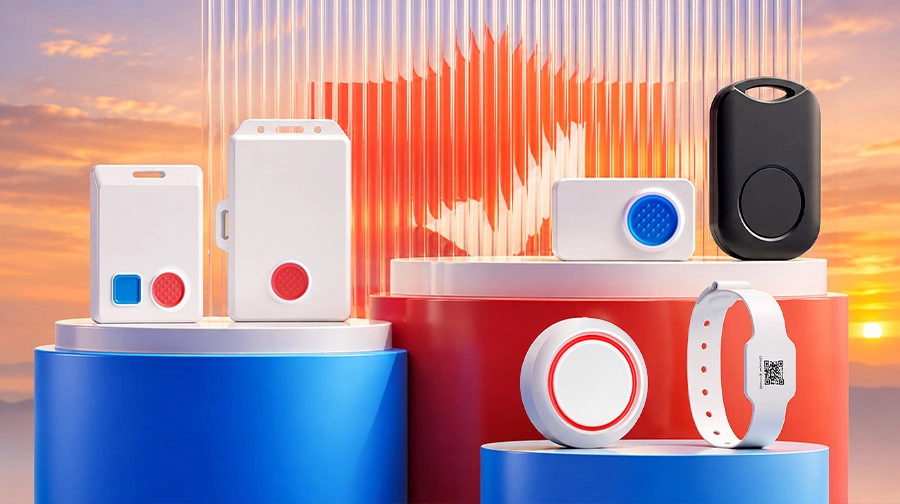
MOKOSMART provides a wide range of employee safety hardware.
BLE Devices
The B2 Smart Badge combines an enlarged SOS button with BLE 5.0 and RFID/NFC, supporting access control and geofenced alerts. The H8 Identification Tag is a compact BLE 5.0 driver tag for fleet management, offering a replaceable battery and optional buzzer. For duress alerting, the H5PD badge provides dual programmable buttons with multi-press modes, integrated RFID for access control in an IP65 enclosure.
LoRaWAN® Devices
The LW006 Smart Badge integrates LoRaWAN®, BLE, Wi-Fi, and GPS for indoor/outdoor tracking. The LW010 Card Tracker offers GPS and BLE positioning in a credit-card form factor. The LW014 Wearable Panic Button is a wristband-style device with programmable multi-click triggers, GPS/BLE positioning, and IP67 durability.
Cellular Devices
The PS101-M Cellular Smart Badge uses Cat-M1/NB-IoT for wide-area connectivity. The smart badge is easily wearable for staff as they move within facilities and outdoor sites. It is suitable for hotel and construction site personnel management.
Gateways
For indoor BLE coverage, the MKGW3 a BLE to PoE Gateway. With support for BLE 5.0, 2.4GHz WiFi, and Ethernet, the indoor PoE gateway offers both wireless and wired connectivity options.
For LoRaWAN® networks, the MKGW2-LW is 8 channel standard LoRaWAN® Based gateway for indoor use. The gateway has a compact appearance and easy to install on the roof, wall and indoor environment.
If you’re looking for employee safety hardware, explore MOKOSMART’s personnel tags and SOS badges now.
FAQ
Q: Do employee safety panic buttons work without Wi-Fi?
A: Yes. They can work without Wi-Fi if they use LoRaWAN® or cellular connectivity, or if BLE tags are paired with functioning gateways and a working backhaul connection.
Q: Can BLE tags tell which room a worker is in?
A: For most room-level location needs, the most practical choice is pairing a LoRaWAN® badge with fixed Bluetooth anchors. The badge scans the anchors placed in hotel rooms. Once detected, the badge transmits data via the LoRaWAN® gateway to the server—enabling precise room-level positioning for rapid emergency response.
Q: How can you stop accidental SOS alarms?
A: Use appropriate activation patterns (e.g., double presses), provide tactile or LED feedback, and consider real-world wearing conditions, such as uniforms and gloves.
Q: Should you choose a panic button or a lone worker device?
A: A panic button requires the user to press it manually. Lone worker devices offer additional features, such as scheduled check-ins, no-motion alerts, and automatic alert escalation. They provide broader functionality rather than serving as a direct replacement for panic buttons.